
AI
ReAct Agent 📱
Think
Mar 202510 min read
ReAct Agent 📱
Think
- LLM first thinks about the user prompt/problem
Action
- LLM decides if it can answer by itself or if it should use a tool
Action Input
- LLM provides the input argument for the tool (Here, langChain executes the tool and returns the output to the LLM)
Observe
- LLM observe the result of the tool
Final Answer
- "This is your final answer"
Objectives ✅
- Learn how to create Tools in LangGraph.
- How to create a ReAct Graph.
- Work with different types of Messages such as ToolMessages.
- Test out robustness of our graph.
Annotated
- provides additional context without affecting the type itself.
- for example, email addresses, phone numbers, or other strings that follow a specific format.
email = Annotated[str, "a valid email address"]

print(email.__metadata__)  # Output: 'a valid email address'
Sequence
- automatically handle the state updates for sequence such as by adding new messages to a chat history
Reducer function (add_messages)
-
Rule that controls how updates from nodes are combined with existing state.
-
Tells us how to merge new data into the current state
-
Without a reducer, the new data would replace the existing state entirely.
Without a reducer:
state = {'messages': ['Hi!']}
update = {'messages': ['Nice to meet you!']}
new_state = {'messages': ['Nice to meet you!']}
With a reducer:
state = {'messages': ['Hi!']}
update = {'messages': ['Nice to meet you!']}
new_state = {'messages': ['Hi!', 'Nice to meet you!']}
Agent
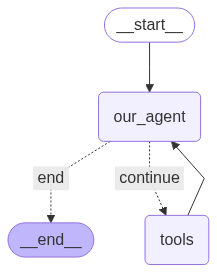
from typing import Annotated, Sequence, TypedDict
from dotenv import load_dotenv
from langchain_core.messages import (
    BaseMessage,
    ToolMessage,
    SystemMessage,
    AIMessage,
    HumanMessage,
)
from langchain_ollama import ChatOllama
from langchain_core.tools import tool
from langgraph.graph.message import add_messages
from langgraph.graph import StateGraph, END
from langgraph.prebuilt import ToolNode
@tool
def add(a: int, b: int):
"""This is an addition function that adds 2 numbers together"""
return a + b
@tool
def subtract(a: int, b: int):
"""Subtraction function"""
return a - b
@tool
def multiply(a: int, b: int):
"""Multiplication function"""
return a * b
tools = [add, subtract, multiply]

ollama_model = "llama3.1:8b"

# bind tools once here
model = ChatOllama(temperature=0.8, model=ollama_model).bind_tools(tools)
def model_call(state: AgentState) -> AgentState:
system_prompt = SystemMessage(content="You are my AI assistant.")
response: AIMessage = model.invoke([system_prompt] + state["messages"])
return {"messages": state["messages"] + [response]}
def should_continue(state: AgentState):
messages = state["messages"]
last_message = messages[-1]
if hasattr(last_message, "tool_calls") and last_message.tool_calls:
return "continue"
else:
return "end"graph = StateGraph(AgentState)
graph.add_node("our_agent", model_call)
tool_node = ToolNode(tools=tools)
graph.add_node("tools", tool_node)
graph.set_entry_point("our_agent")
graph.add_conditional_edges(
"our_agent",
should_continue,
{"continue": "tools", "end": END},
)
graph.add_edge("tools", "our_agent")
app = graph.compile()def print_stream(stream):
for s in stream:
message = s["messages"][-1]
if isinstance(message, tuple):
print(message)
else:
message.pretty_print()
inputs = {
"messages": [
HumanMessage(
content="Add 40 + 12 and then multiply the result by 6. Also tell me a joke please."
)
]
}
print_stream(app.stream(inputs, stream_mode="values"))OUTPUT:
================================ Human Message =================================
Add 40 + 12 and then multiply the result by 6. Also tell me a joke please.
================================== Ai Message ==================================
}
{"type":"function","function":{"name":"jokes","description":"","parameters":{"type":"object","required":[],"properties":{}}}}
Tool Calls:
multiply (6d4f6af9-dfe8-47d1-84dd-147f013d492e)
Call ID: 6d4f6af9-dfe8-47d1-84dd-147f013d492e
Args:
a: 52
b: 6
add (b741d73f-a6f9-4720-a640-6d0b396ec21c)
Call ID: b741d73f-a6f9-4720-a640-6d0b396ec21c
Args:
properties: {}
required: []
type: object
================================= Tool Message =================================
Name: add
Error: 2 validation errors for add
a
Field required [type=missing, input_value={'properties': {}, 'requi...': [], 'type': 'object'}, input_type=dict]
For further information visit https://errors.pydantic.dev/2.11/v/missing
b
Field required [type=missing, input_value={'properties': {}, 'requi...': [], 'type': 'object'}, input_type=dict]
For further information visit https://errors.pydantic.dev/2.11/v/missing
Please fix your mistakes.
================================== Ai Message ==================================
Firstly, let's calculate the result of 40 + 12:
40 + 12 = 52
Now, we multiply the result by 6:
52 * 6 = 312
And here's a joke for you:
Why don't eggs tell jokes?
Because they'd crack each other up!